
Publer Review: A Deep Dive into Its Features, Pros, and Cons
Let’s chat about something cool—Publer! 😊

This awesome tool helps you manage your social media accounts like a pro. Whether you’re scheduling posts on Facebook, Instagram, or LinkedIn, Publer makes it easy. You know those AI features that pick the perfect time to post? Yup, Publer’s scheduling tools have that! And guess what? It’s pocket-friendly too, with a free plan!
Whether you’re a business user or an individual, Publer’s plans will assist you. But is it the right fit for you? 🚀 Let’s find out!
Overview of Publer
Are you tired of trying to keep track of your social media accounts and posts across multiple platforms? Say hello to Publer—a social media scheduling tool that’s here to save the day! With Publer, scheduling becomes easy and efficient! 🌟
With over 240,000 users onboard, including savvy social media managers and marketing professionals, Publer isn’t just another social media tool. Its key features support diverse platforms like Facebook, Instagram, and LinkedIn, allowing you to schedule posts in bulk and manage all your social accounts effortlessly, making scheduling as easy as pie.
You can:
- Schedule posts in advance using Publer’s scheduling tool.
- Use a nifty drag-and-drop content calendar to plan your marketing strategy.
- Create eye-catching social media images effortlessly with our design features.
With Publer, you’re not just managing posts, you’re orchestrating a symphony of content! This powerful social media tool takes care of autoscheduling, post recycling, and even bulk scheduling, assisting you in managing your media efficiently. It’s like having extra hands! Plus, with visually pleasing organization options, Publer makes social media marketing easy, ensuring you won’t miss a beat.
Here’s another perk: Publer’s multi-account Workspaces feature allows you to organize your social media content for different brands effectively. With Workspaces, you can manage multiple accounts through separate dashboards, making it ideal for professional agencies handling various client profiles or businesses operating multiple brands. This tool streamlines your scheduling and content management, enhancing your social media marketing efforts.
Try Publer for free, and watch your social media marketing game rise to new heights with easy scheduling! 🚀
Getting Started With Publer
First things first, you’ll need to connect your social accounts using Publer’s app. It’s a walk in the park and feels almost magical! Imagine having all of your Facebook pages, LinkedIn profiles, and Pinterest accounts all at your fingertips.

With this user-friendly interface, scheduling posts becomes second nature. Publer’s tools help make content management straightforward and efficient. You’ll love how easy it is to manage your marketing content!
Here’s your game plan:
- Connect up to 5 social media accounts with the free plan.
- Plunge into composing your first social media post using the easy-to-use tools. 🎨
- Use the post preview feature to review and refine your creation before it hits the internet.
Need help? Publer’s customer support is your trusty co-pilot, ready to assist you via chat or email anytime! Additionally, Publer’s Chrome extension allows you to schedule posts directly while browsing the web. This handy tool integrates seamlessly with the Publer app, providing an extra layer of convenience to ensure you never miss a chance to manage and schedule your content on the go!
Publer isn’t just about function—it’s about fun. Tap into those built-in analytics tools and feature sets to feel like a social media genius. With Publer’s comprehensive tools, you can create, analyze, and optimize your posts effortlessly. Trust me, you’re on your way to revolutionizing how you manage and market your content like a professional! 🌟
Supported Platforms
Here is a full list of platforms that Publer currently supports as part of its leading social media scheduling tools:
- X (Formally Twitter)
- Google My Business
- YouTube
- TikTok
- WordPress
- Telegram
- Mastodon
- Threads
- Bluesky
Key Features and Functionality
Now, let’s talk about what makes Publer a standout tool: its features and functionality. They have got all the bells and whistles you’d want in social media scheduling tools. With the power of auto-scheduling, content curation, and post recycling at your fingertips, it’s like having a mini assistant!
- Multi-platform Support: Easily manage multiple social media accounts like Facebook, Instagram, and LinkedIn, all under one roof. Cool, right?
- Analytics Features: Track how your content performs with our best analytics tools and make data-driven marketing decisions. Feel like a pro!
- VistaCreate Integration: Get creative with design—right inside the Publer app!
- Hashtag Suggestion Generator: Never fumble for hashtags again. Our tool suggests them based on engagement insights.
- Publer AI Assist: Need help crafting content? It’s like a creative buddy, always ready to assist! Who doesn’t love that?
- Follow-up Comments: Schedule comments to appear on your posts after publishing them—especially useful for keeping captions clean or adding hashtags in comments!
AI Features and Content Management
Let’s immerse ourselves in Publer’s cool AI features and content management tools for social media scheduling! 🌟
You’re gonna love how this tool assists in making your social media game stronger. Publer’s AI Assist is like your new best friend, generating exceptional captions and visuals for your content effortlessly. Got writer’s block? Not anymore! This AI feature will kickstart your creativity and help you create professional posts with ease.
And hey, don’t miss the hashtag suggestion generator—it’s pure gold for maximizing engagement. This feature assists you by providing the best hashtag suggestions to enhance your social media posts.
Want to stay organized? Publer’s design tools and content management features are just what you need! With a slick content calendar and easy post recycling tools, scheduling and keeping your social media marketing on track is a cinch.
Plus, you can preview your Instagram profile feed for that perfect aesthetic! 🎨 Need to track your progress? Publer’s powerful analytics tools provide insights to fine-tune your social media strategy and assist you in optimizing your marketing plan.
Another handy feature to spice up your workflow: Publer’s Link in Bio tool lets you create a personalized landing page to host multiple links, a valuable tool for directing Instagram followers to multiple destinations seamlessly. This feature assists in enhancing your social media marketing by providing easy access to your various profiles and content.
Pricing and Customer Support
Publer offers a range of plans that cater to everyone from solo users to big-shot business enterprises. The free plan features let you connect up to three social media accounts—except Twitter—and schedule 10 posts per account. Perfect for dipping your toes into social media scheduling tools!
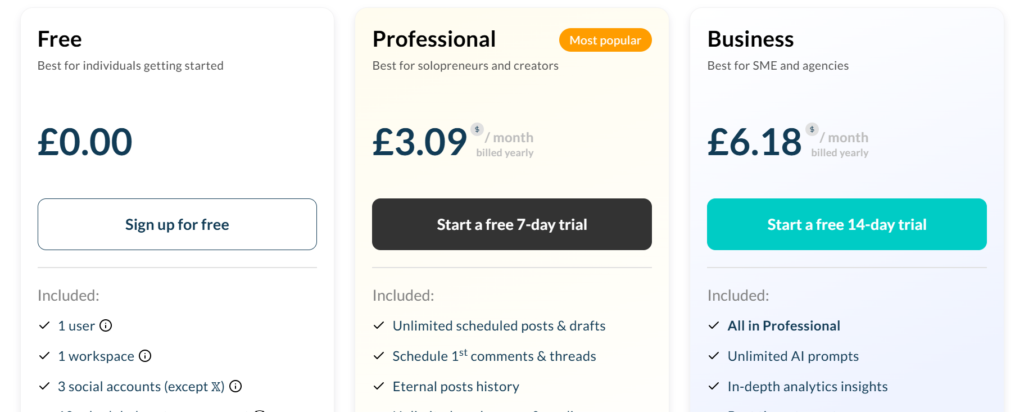
Professional plan features ramp things up with unlimited post scheduling, bulk scheduling tools, and Twitter integration. Plus, digital marketing agencies will love the limitless Media Library, providing all the tools needed for effective social media management.
Need more? The business plan features include detailed analytics reports and best time to post insights, assisting your marketing strategy. Want authority of the universe? The enterprise plan throws in dedicated onboarding tools and prioritized support for large companies, along with early access to new scheduling features.
For current pricing and plan options, you should check on Publers’ website.
Now, let’s chat about their customer support. It’s stellar! 🏆 You can reach out for assistance via chat, email, or even social media accounts. Got a question? The thorough help documentation and support tools likely have your answer, making it easy for every user.
Pros and Cons of Publer
If you’re juggling multiple social media accounts and hunting for a scheduling tool that assists in content management and makes it a breeze, Publer might just win your heart.
Its pros?
- A user-friendly interface that’s as effortless as silk, making scheduling posts easy.
- Superb design tools with cool integrations to enhance your social media marketing.
- Time-saving social media scheduling options like bulk scheduling and post recycling.
- Plus, those AI features? They’re worth a thousand words and assist in content creation!
But hey, it’s not all sunshine. Here are some cons to chew over:
- The free plan limits some advanced features.
- Twitter/X integration requires a paid plan. Oof.
- Missing a unified inbox and social listening tools, which might be a dealbreaker if you’re aiming for an all-in-one social media scheduling solution.
On the bright side, Publer offers affordable paid plans that await. Publer isn’t a one-size-fits-all social media management app, but for design and scheduling, it’s one of the best tools out there! 🌟
Publer Alternatives
Among the Publer alternatives are some of the best social media scheduling apps, like SocialBee, which you’ll find many rave about in their comprehensive reviews. SocialBee brings its own unique approach to social media management, including powerful AI features and advanced analytics tools to assist in your marketing efforts.
Another fantastic competitor worth investigating is Pallyy, especially if you focus on visual platforms like Instagram and TikTok. It offers one of the best visual interfaces to plan, schedule, and visualize your social media content effectively.
And let’s not forget about those essential SEO tools that some Publer competitors include—another useful tool for optimizing your social media posts for search engines.
Final Thoughts on Publer
If you’re a social media whiz looking for efficiency, Publer covers your bases. From autoscheduling to foolproof post recycling, this scheduling tool is like having a trusty sidekick. However, for those seeking extra bells and whistles like competitive analytics or social listening tools, it’s worth comparing Publer’s features with other tools like SocialBee or Pallyy.
But, is Publer the perfect social media scheduling tool for you? 🤔 Click here and try it out for free!

