MergeMatic CSV: One Tool to Combine CSV Files
I built MergeMatic CSV because I needed it myself. I work with data all the time. Some of it is for marketing, some for business reports, and a lot of it is in the form of exported CSV files. The problem is, those files almost never play nicely together.
At one point, I was spending far too much time just trying to clean and combine data. That time should have been spent on analysis, outreach, or decisions. Instead, I was stuck renaming columns, removing duplicates, deleting empty rows, fixing character errors, and trying to merge files that didn’t match. It felt like I was doing the same boring task every day.
That’s where MergeMatic CSV started.
The problem with combining CSVs
Anyone who works with more than one tool has probably dealt with this. You download a bunch of CSV files, but when you try to open them, they’re inconsistent. Some columns have different names. Some files are in a different order. Some have empty fields or special characters that break your software. If you try to merge them manually in Excel, you run into size limits, formatting issues, or duplicated data that’s hard to spot.
For example, I often export backlink reports from SEMrush and Ahrefs. I get one file per client, per source. Sometimes I run multiple versions of the same report. Then I have five or six files, all with slightly different formats. I just want to combine them into one clean file that I can work with, but there’s no built-in tool that does this well. So I built one.
What MergeMatic CSV does
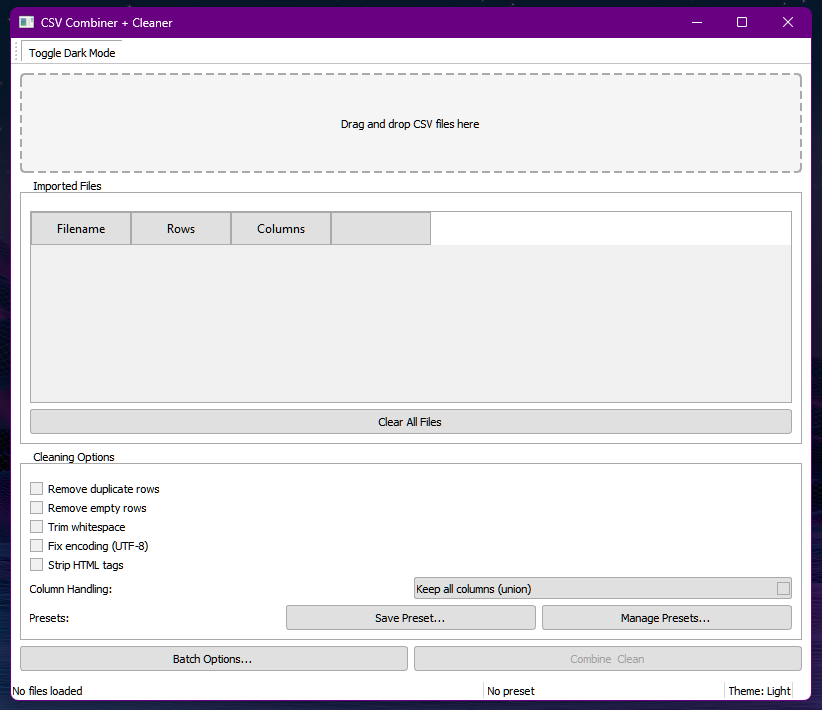
MergeMatic CSV is a small desktop program that runs on Windows 10 and 11. You don’t need to install anything. You just open the app and drag in the files you want to work with.
Here’s what it can do:
- Combine multiple CSV or TSV files into a single output file
- Match columns intelligently, even if they don’t appear in every file
- Let you choose whether to keep all columns or only the ones they have in common
- Automatically remove duplicates
- Clean up empty rows, extra spaces, and broken text
- Remove unwanted HTML tags
- Handle large files without freezing
- Split large output files into smaller ones if needed
- Save your settings so you can use the same process next time
You can also preview the data before saving and export to Excel if that’s what you need.
Who it’s for
I originally built MergeMatic CSV for handling backlink data, but it turned out to be useful in more areas than I expected.
If you’re in SEO, it helps when you’re exporting backlink or keyword data from multiple tools.
If you’re in sales or business operations, you might be merging product listings, customer exports, or sales reports.
If you work in research or data analysis, you may be consolidating survey responses, data logs, or report outputs.
If you’re a freelancer, you probably deal with random exports from whatever tools your clients use. Those files rarely come in clean. MergeMatic CSV helps bring order to that mess.
Try it
MergeMatic CSV is available now. It’s a one-time purchase of $10. There’s no account required and no subscription. Just download, use it, and get your work done faster.
You can get it here:
CLICK HERE TO BUY
If you regularly work with CSV files from different sources, this tool will save you time. That’s why I built it.